SAP Field Service & Asset Management
Proactively Plan and Execute Service,
Maintenance, and Projects
What is SAP Field Service and Asset Management?
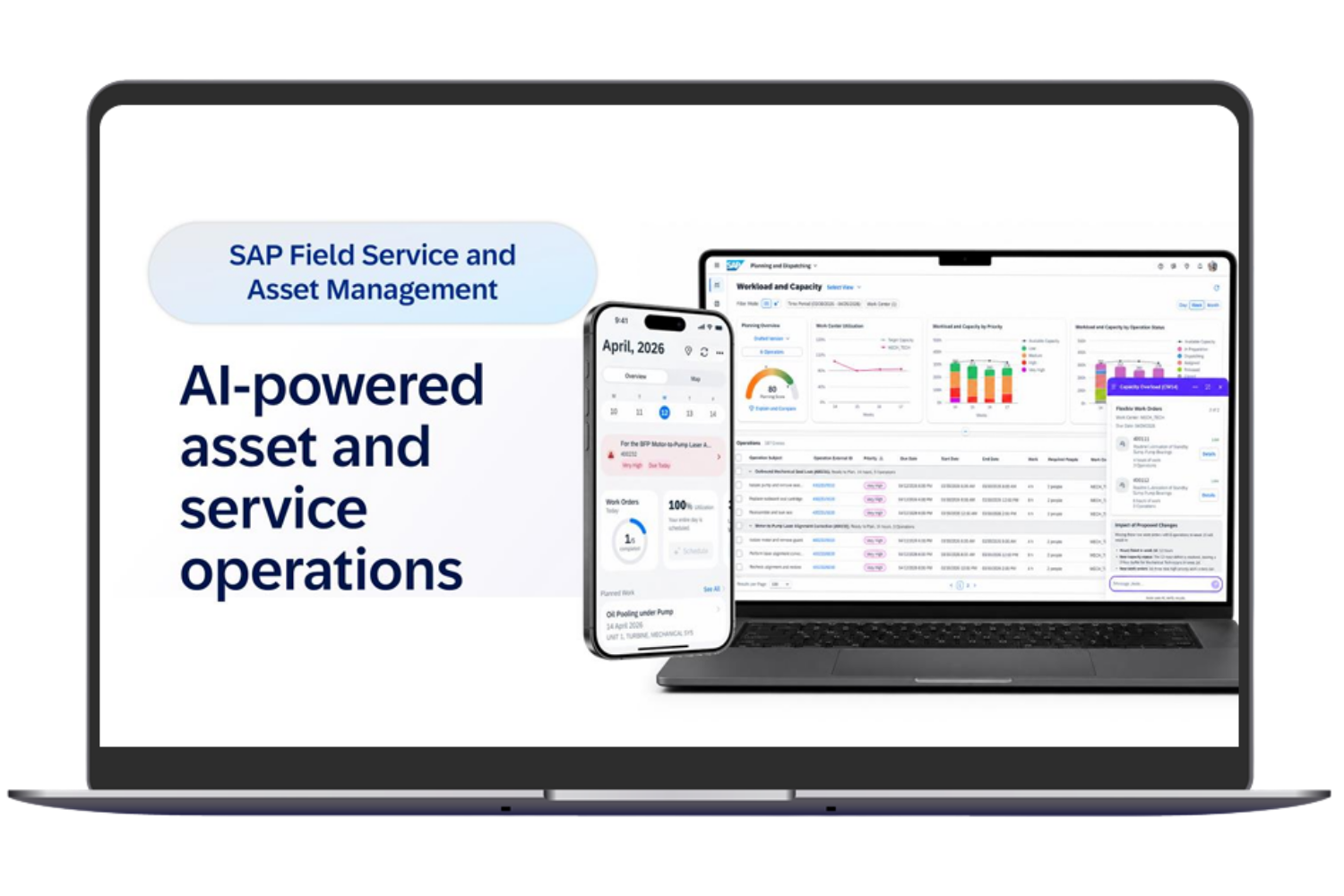
SAP Field Service and Asset Management (SAP FSA) connects work backlogs, capacity planning, scheduling, dispatching, and mobile execution into seamless service and asset management processes. The solution supports both customer-related service assignments and maintenance activities involving assets and equipment – from planning and scheduling to reporting back into the SAP backend.
Since Release 2605, the solution formerly known as SAP Field Service Management (SAP FSM) has been continued under the name SAP FSA. This evolution places greater emphasis on aligning workloads, available resources, and operational execution.
proaxia helps you make the most of these capabilities. From process design and SAP integration to implementation and training, we support you throughout the adoption process. Together, we optimize capacity and resource planning, integrate FSA Mobile into technicians’ daily workflows, and connect field service reporting with subsequent processes in the SAP backend.
The focus is not on individual features, but on end-to-end service processes that seamlessly connect dispatchers, technicians, and back-office teams.
Your Business Benefits with SAP FSA and proaxia
Planning for Various Service and Asset Tasks

Source: SAP SE, as of October 12, 2026
A short repair assignment poses different challenges than routine maintenance, plant maintenance, or a commissioning project lasting several days. Assignments carried out under performance-based service contracts must also be coordinated with the available skilled personnel and resources.
Together with you, we establish the connection between long-term planning and daily scheduling. We take a holistic view of capacities, qualifications, deadlines, and material requirements—before assigning a specific task to a technician.
After completion, the necessary feedback is incorporated into future planning and the associated SAP processes. This ensures that day-to-day operations, maintenance, installations, and service projects remain interconnected.
SAP FSA Mobile – From Work Schedule to On-Site Execution
Whether it’s maintenance, repairs, installation, or assignments lasting several days: Your technicians need the right information, clear step-by-step instructions, and easy ways to provide feedback. SAP FSA Mobile links scheduling with actual execution—even offline.

Source: SAP SE, as of October 12, 2026
SAP FSA Features: From Capacity Planning to Confirmation
What tasks are on the agenda for the coming weeks? What teams and skills are needed? And where are bottlenecks emerging?
SAP FSA already supports demand and capacity planning as well as detailed scheduling and resource allocation. proaxia integrates these capabilities with your business processes and creates the appropriate data foundation for proactive workforce planning.
The proaxia FSA Cloud Connector already provides integration capabilities between SAP FSA and the SAP backend. These capabilities are continuously expanded in line with the ongoing development of FSA Cloud features. We coordinate the specific scope of integration on a release- and project-specific basis.

Source: SAP SE, as of October 12, 2026
Effective resource planning requires clear rules and an appropriate database. Together, we’ll tailor qualifications, priorities, master data, and planning rules to your service organization.
Rule-based or AI-powered planning functions are used wherever they provide meaningful support for your day-to-day scheduling tasks. Routes and schedules are determined based on the requirements of each specific assignment.
This provides support for specific planning decisions—rather than automation whose results don’t align with your processes.

Source: SAP SE, as of October 12, 2026
Installations, commissioning, and project-related assignments that span several days require more detailed planning than a single-day job.
Using SAP FSA Planning, Dispatching, and Capacity Management, we organize work packages, assignment periods, qualifications, and resource allocation. This allows us to coordinate longer-term assignments with daily scheduling and available capacity.
For PS- or PP-based processes, we also verify that they are properly mapped and integrated with the SAP backend.
SAP FSA Mobile delivers work orders, asset and equipment information, and the corresponding work steps directly to your technicians.
Guided workflows, Smartforms, and checklists support consistent and efficient on-site execution. Times, materials, expenses, measurements, notes, photos, and other attachments can be recorded directly during the assignment.
Technicians can continue their work even without an Internet connection. As soon as a connection is reestablished, FSA Mobile synchronizes the data that has been recorded. We define which functions, fields, and confirmations are used in the “Fit-to-Standard” specification for the specific process.
Depending on the target architecture, SAP Service and Asset Manager or an existing mobile solution may also be considered. We are evaluating these possibilities as complementary architectural options.
Maintenance, commissioning, acceptance, or service report: Different tasks require different information.
We tailor Smartforms to specific work steps and link the data entry process to the required backend result. This ensures that forms not only support on-site documentation but also facilitate subsequent processing within the overall workflow.
What information does the scheduling department need for the next planning cycle? What does the back office need for further order processing? And what results are relevant to service management?
Together, we define the necessary feedback and make order status, times, and materials available within the agreed-upon process. Reports should support operational decisions—rather than simply displaying additional data.
Review times and materials together
Technicians record their hours, materials, expenses, and other job-related information during or after their assignments.
In the Time and Material Journal, the back office reviews the entries that have been recorded. These entries can be approved, rejected, or returned to the technician with a request for corrections. After the corrections are made, the information is resubmitted and reviewed.
This creates a transparent review, approval, and correction process between the field staff and the back office. Approved data can then be processed further in the designated SAP follow-up processes.

Source: SAP SE, as of October 12, 2026
External resources should not result in separate processes. proaxia coordinates roles, responsibilities, and handoffs between your organization and external service partners.
When using Crowd Service, we consider not only scheduling but also the necessary backend processes and, if applicable, procurement. This ensures that collaboration with external resources remains integrated into the service delivery process.

Targeted Expansion of SAP FSA: Customer Portal and Material Planning
Customer Self-Service:
Transforming It into a More Comprehensive Service Portal with proaxia CSS
SAP FSA offers its own customer self-service features, such as for service requests, scheduling appointments, and checking status information. For companies that want to engage their customers beyond individual service calls, the proaxia Customer Service Suite (CSS) expands these capabilities.
The service portal links customer inquiries and equipment information with service history, recurring services, appointment scheduling, and document exchange. This provides customers with digital access to the service information relevant to them and to the status of their requests.
Preconfigured integrations instead of building a portal from scratch: SAP and FSA connections make it easier to get started. We determine which CSS modules, permissions, workflows, and backend connections to use during the Fit-to-Standard process.
A streamlined start is also possible—for example, with digital appointment booking and rescheduling via CSS Lite.
Plan Material Requirements Directly in SAP FSA: proaxia FCM
Simply assigning the right technicians is not enough if the necessary components are missing. With the proaxia Field Service Component Manager (FCM), dispatchers can manage material requirements directly in the FSA planning and scheduling dashboard.
No in-depth knowledge of the SAP backend is required. In the documented CS and PM scenarios, changes are synchronized with the SAP backend via the proaxia FSA Cloud Connector. This creates a closer integration between material planning, resource allocation, and the order process.
FCM is a complementary solution with its own set of features and implementation scope. It is not automatically included in every FSA implementation or starter package.
Why Choose proaxia for Your SAP FSA Consulting and Implementation?
SAP FSA Integration: Tailored to Your SAP Environment
Seamless integration involves more than just providing feedback after an assignment. Order fulfillment, scheduling, staff assignment, and subsequent backend processing must all work together seamlessly.
Depending on the system environment and process, there are two standardized methods available for this.

Integration via the proaxia FSA Cloud Connector
The proaxia FSA Cloud Connector connects SAP FSA with SAP ECC, as well as SAP S/4HANA On-Premise and Private Edition.
We will assess which order models and process steps to integrate based on your specific requirements. In doing so, we will consider both the operational work in FSA and its integration with the SAP backend.
Integration Using the Standard SAP Method
Alternatively, we will evaluate the appropriate SAP standard integration. For SAP S/4HANA Cloud Public Edition, the corresponding SAP standard path is used, since PCC does not support this edition.
In supported private and on-premises environments, the selection depends on the scope of the process, extensions, and operational requirements. PCC is therefore not automatically a prerequisite for implementing SAP FSA.
Connect Specific Utilities Processes to SAP FSA
For utility companies, we address workforce planning, scheduling, and the integration with meter reading and device processes separately.
Our Meter-to-Cash page demonstrates how SAP FSA and PCC integrate the planning, mobile execution, and integration of meter and device processes with SAP Utilities.
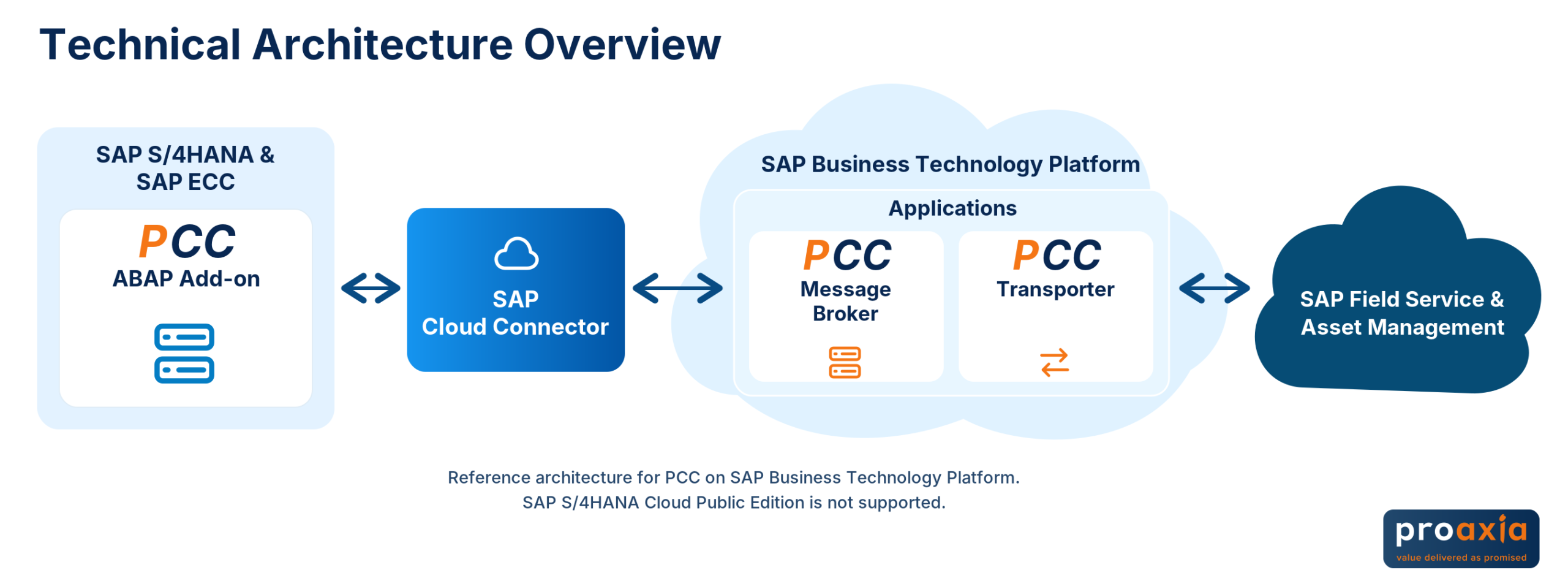
Continuous Development: The proaxia FSA Cloud Connector is continuously adapted to new SAP FSA features and integration requirements. The available functionality is determined based on the release in use and the respective SAP landscape. Additional planned enhancements, such as direct SD order integration, can be found in the PCC roadmap.
Getting Started: The proaxia FSA Starter Pack
Implement SAP FSA Using a Defined Standard Process
Package price: 99,000 EUR
Planned go-live: 9–12 weeks for the agreed-upon standard scope.
The FSA Starter Package provides a clearly defined introduction to technician scheduling and mobile execution. Together, we’ll determine which processes, master data, and integration scenarios are needed for your initial production scope.

What features are included in the starter package?
| Section | Content included in the agreed-upon standard scope |
|---|---|
| Master Data | The master data required for the defined process. |
| Planning and Scheduling | Automatic and manual planning for the agreed-upon deployment process. |
| FSA Mobile | Mobile order processing, guided workflows, and digital field reports included in the agreed-upon standard scope |
| Digital Forms | Smartforms for the intended workflow steps. |
| Feedback | Review and approval of the recorded results. |
| Basic AI Scenarios | Appropriate functions within the agreed-upon and licensed scope. |
The specific details will be determined during the scoping phase.
From the Solution Demo to Go-Live
Demo and Fit-to-Standard: We demonstrate the solution and align your requirements with the intended standard process. This results in the agreed-upon project scope.
Setup, Configuration, and Integration: SAP FSA is set up and connected to the agreed-upon SAP backend process—for example, SAP S/4HANA Service or relevant EAM, PS, PP, or ECC CS/PM scenarios.
Project Support and Training: Project coordination and training for administrators and key users accompany the implementation. Go-live support facilitates the transition to production use.
A clearly defined starting point — no unlimited project scope
Additional requirements for planning and integration that go beyond the agreed-upon standard scope, complex PS/PP or SD scenarios, and alternative mobile applications are not automatically included in the package price.
The price and timeline apply to the agreed-upon scope of work. Prerequisites and any additional services that may be required will be clarified before the contract is awarded.
Are you already using SAP FSA? Make targeted improvements to your existing processes

Not every project begins with a new implementation. Perhaps you’re currently experiencing bottlenecks in planning, mobile data entry, SAP integration, or collaboration with the back office.
Together, we’ll identify the areas that need attention and determine the appropriate next step. The focus is on making better use of existing functions and closing specific process gaps.
References: SAP FSA in Interaction with Processes and People
Albstadtwerke: Mobile Maintenance and Integrated Field Service
Albstadtwerke, in collaboration with proaxia, has replaced paper-based service and maintenance procedures with digital processes.
The implementation of SAP Field Service Management—now known as SAP FSA—and PCC integrated mobile work with the existing SAP ECC landscape. Feedback, checklists, and status information support collaboration between scheduling, technical staff, and the back office.

EOS: Connecting Global Service Processes
EOS has integrated proaxia, SAP Service Cloud, SAP FSA, and SAP S/4HANA into a unified service landscape.
This case study demonstrates how customer service, mobile execution, and backend systems can be designed in tandem. Standardized processes and a unified information base support collaboration among global service teams.

INICOM: Digital Appointment Scheduling with CSS Lite
INICOM is expanding its existing field service solution with proaxia CSS Lite. Customers can select or reschedule service appointments through a digital self-service channel.
This example illustrates a targeted approach to digital customer interaction: Appointment scheduling is integrated with resource planning, reducing the manual effort required for coordination.

Frequently Asked Questions About SAP Field Service & Asset Management
Bring Planning and Execution Together in Your Service
Would you like to implement SAP FSA or get more out of your existing solution?
Discuss your processes, your SAP landscape, and the improvements you hope to achieve with your next steps. Together, we’ll examine planning, scheduling, mobile execution, and backend processing—and define a suitable starting point for your organization.