proaxia FSA Cloud Connector
Planning, Field Service, and
Seamlessly Connecting SAP Business Processes
What is the proaxia FSA Cloud Connector?

The proaxia FSA Cloud Connector (PCC) is a standardized and configurable integration solution that connects SAP Field Service and Asset Management (formerly SAP Field Service Management or SAP FSM) with SAP ECC and SAP S/4HANA. PCC seamlessly integrates planning and mobile execution into existing business processes – from short service assignments and maintenance activities to multi-day installations.
SAP orders and business transactions are transformed into plannable service assignments in FSA. Appointments, personnel assignments, working hours, materials, checklists, and status information remain linked to their original SAP objects and are available for further processing in the backend.
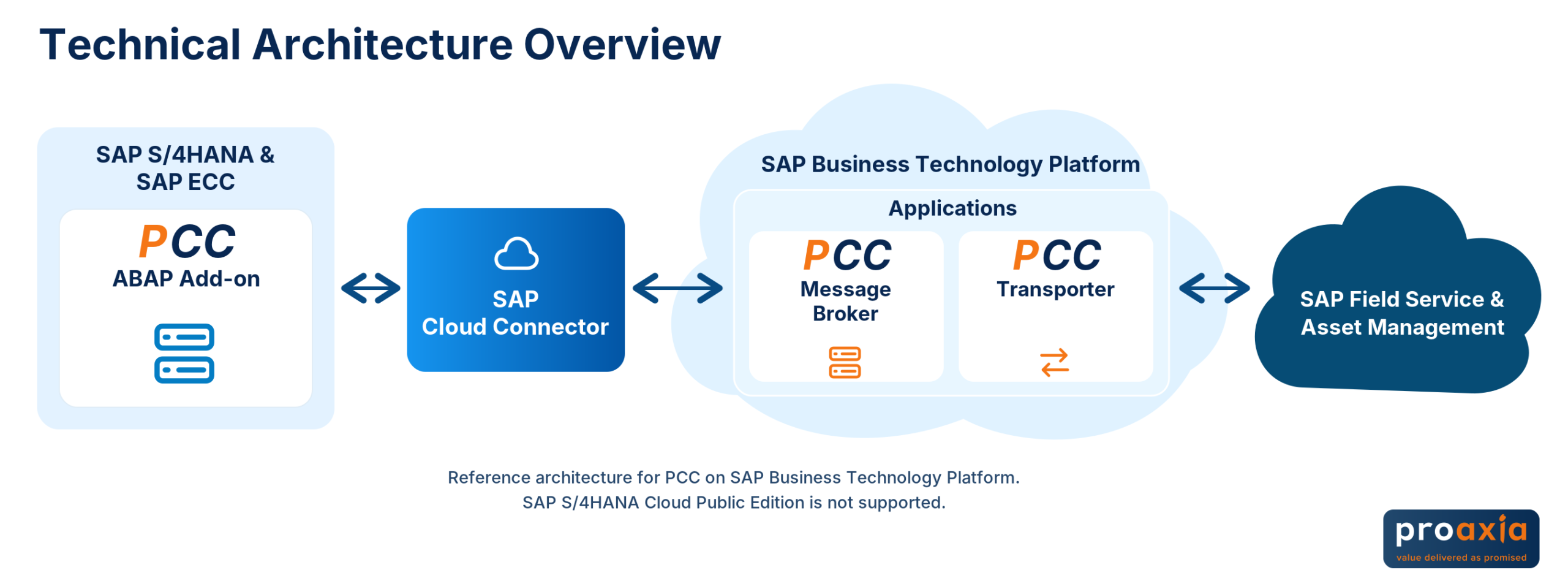
The technical foundation is an ABAP add-on within the SAP system. Message Broker and Transporter handle data conversion and communication. Predefined functions, configuration options, and extension points reduce the need for custom interfaces.
Proven since 2011. Developed and maintained by proaxia. Licensed and distributed by SAP. Available for SAP ECC and SAP S/4HANA On-Premise and Private Edition.
Your Business Benefits with the FSA Cloud Connector
Which SAP processes does PCC integrate with SAP FSA?
Maintenance, installation, commissioning, and customer service can be organized using different SAP process models. The FSA Cloud Connector links supported orders and operations with planning, scheduling, and execution in SAP FSA.
The available functions depend on the backend, the connector component used, and your process model.

SAP S/4HANA Service and SAP Customer Service

Link service orders and their line items to scheduling and feedback from the field. PCC supports SAP S/4HANA Service as well as traditional customer service processes in SAP ECC and supported S/4HANA Compatibility Mode scenarios.
With ” Service with Advanced Execution,” the business service order and the technical execution are considered together. This ensures that the operational task remains embedded within the overarching service process.
SAP EAM and PM: Maintenance Based on Work Orders

Integrate maintenance orders, tasks, components, and confirmations into your field service processes. Equipment, functional locations, and material information provide additional context.
This allows scheduled maintenance tasks and short-term maintenance needs to be integrated into resource planning and execution. The status updates remain assigned to the respective SAP process.
SAP PS: Projects, Installations, and Commissioning

If installations or service projects are organized using the SAP Project System, PCC links their operational steps to FSA. In the network-based integration, network orders are transferred as service calls and network activities as activities.
Dates, personnel assignments, project materials, and feedback retain their project context. This makes it possible to break down even longer assignments into manageable work steps.
SAP PP: Production Orders as the Starting Point for Assignments

Production orders can also serve as the basis for installation or service-related work. PCC links supported PP orders and operations to FSA service calls and activities. In doing so, it takes into account not only feedback but also scheduling, responsible personnel, and service dates within the context of the order.
The documented standard variant requires, among other things, a serial number-based production order with a quantity of 1. We will determine whether your assembly, picking, or installation process is compatible based on the specific order and process logic.
Automotive and Heavy Equipment: Service Outside the Workshop

SAP Utilities: Meter-to-Cash Through to Field Operations

PCC integrates supported equipment processes from SAP Utilities with planning, scheduling, and execution in FSA. These include equipment installation, equipment removal, and equipment replacement.
Meter information and meter readings from these processes are further processed in the backend. The standalone integration of periodic meter readings is a planned enhancement and should be distinguished from the supported device processes.
SAP SD: Overview of Customer Order-Related Service Processes

If services are managed administratively through SD sales orders, integrating them with Field Service can be an alternative goal.
Direct PCC integration of SD sales orders is planned. It is intended to enable order-related tasks for planning, scheduling, and execution in FSA. Work reports, confirmations, and billing steps will be defined in the process design. Pricing and invoicing will remain part of the agreed-upon SAP backend process.
Scheduling for Field Service with SAP FSA
Efficient deployment begins before the mobile implementation. The work queue, deadlines, required qualifications, and available resources must all align.
The FSA Cloud Connector provides the necessary backend information for the supported scenario and links planning results to the SAP process. The planning functions themselves are located in SAP FSA—PCC provides the process integration. Which objects, dates, and assignments are synchronized depends on the specific integration scenario.

Scheduling Based on Your SAP Processes
Integrated orders and processes can be used for resource planning in FSA. Documented scenarios—such as network plan integration—also take into account the rollback of deadlines and personnel assignments.
PCC already integrates SAP orders and planning-related information with SAP FSA. The integration capabilities are continuously being expanded, particularly in conjunction with the new features for workload and capacity planning. The information available in each process depends on the backend system and release version. It should not be equated with the existing planning capabilities for integrated orders.
Organizing multi-day installations and project assignments
For longer-term projects, timeframes, work packages, and resources must be considered together.
SAP FSA Planning, Dispatching, and Capacity Management also enable the planning of installations and project assignments lasting several days. proaxia integrates assignment periods, work packages, qualifications, and resource planning with the supported SAP order processes.
How these activities are linked to PS or PP objects is defined in the target process. This does not involve an automatic, complete 1:1 transfer of all SAP project structures.
Scheduling and Self-Service for SAP FSA

Customers shouldn’t have to schedule service appointments solely by phone. With the complementary proaxia Customer Service Suite (CSS) , you can enhance field service scheduling with digital self-service features.
Service Appointment Management allows customers to schedule, adjust, or reschedule appointments for on-site service calls. Information about past and upcoming service calls is available digitally. Appointment scheduling is integrated with the scheduling module in SAP FSA.
The responsibilities are clearly defined: CSS supports customer interaction and scheduling. PCC connects the supported FSA processes to the SAP backend. The self-service interface is a supplementary solution and not a standalone portal feature of the FSA Cloud Connector.
From the SAP Order to the Confirmation: Integration in Day-to-Day Work
PCC connects not only systems, but also the individual steps of a business process. This connection begins with the assignment of tasks and extends to the further processing of the results in the backend.
| Process Step | Benefits of the FSA Cloud Connector | Benefits for Your Business |
|---|---|---|
| Provide Work | In the supported scenario, approved orders or operations are made available in FSA as service calls and activities. | The SAP worklist is available for scheduling. |
| Coordinate Assignments | Schedule changes and personnel assignments are tracked back to the corresponding SAP object in documented scenarios. | Planning and order processing remain aligned. |
| Processing Work Hours | In supported scenarios, the start and end times of an activity can be processed using a configurable time allocation. | This reduces the effort required for manual post-processing. |
| Assign Material Consumption | Materials used are linked to the order and the planned goods movements. | Material consumption and the business process remain traceably linked. |
| Reuse Checklists | Results from checklists and Smartforms can be processed further in the backend according to configurable settings. | The information collected supports subsequent process steps. |
| Complete the work | Status, times, materials, and completion information are fed into the backend process. | This creates a foundation for order completion, billing, and analysis. |
Automated follow-up processing is set up for the process model in use. The extension of time allocation to SAP S/4HANA service orders is planned as a roadmap feature.
Features for End-to-End Service and Maintenance Processes
How does the FSA Cloud Connector work from a technical standpoint?

Technical Implementation in the SAP Backend
The ABAP add-on forms the business core of the integration. It links SAP business objects to events, Customizing settings, and designated extension points.
Relevant changes generate messages. Incoming information from FSA is assigned to the appropriate SAP objects and processed within the respective business process.
Connecting SAP Cloud and ERP via Message Broker and Transporter
The Message Broker handles data processing and conversion. The Transporter provides the communication layer to SAP FSA.
In the recommended operating model, the Message Broker can be deployed on the SAP Business Technology Platform and connected to the ERP system via SAP Cloud Connector. PCC and SAP BTP are therefore not competing approaches but can be components of the same architecture.
Controlled synchronization and traceable operation
A full sync of the relevant objects is available for the initial data transfer. Regular synchronization is disabled during this process.
During operation, IDocs, queues, status information, application logs, and message broker monitoring support monitoring and error analysis. This allows for technical tracking of the processing.
Extensions within a defined integration architecture
Customizing and ABAP extension points enable additional logic for customer-specific requirements. This does not require the technical transport chain to be completely redeveloped.
Customer-specific extensions remain the responsibility of the customer in terms of testing, upgrades, and operations. Their scope should therefore be planned in conjunction with the functional requirements and the operating model.
Combine planning and mobile applications to fit your process
Choosing SAP FSA as a planning and scheduling solution does not automatically determine which mobile applications to use.
A homogeneous architecture with FSA Mobile offers benefits for both IT and business. For documented CS and PM scenarios, SAP Service and Asset Manager is also an option within the overall architecture. PCC synchronizes the relevant SAP and FSA objects; the mobile application uses its own backend and FSA connections. Mappings, IDs, and confirmation paths are coordinated.
Additional mobile applications are evaluated based on their architectural and process fit. PCC is not a one-size-fits-all, preconfigured adapter for every app. In particular, PS, PP, Utilities, and Smartform scenarios must be evaluated with regard to the functions that are actually supported.

PCC or SAP Standard Integration: Which Approach Is Right for You?

There are various standardized integration methods available for connecting SAP FSA to SAP ERP.
The term “native” SAP standard integration, as it is often referred to, refers to the integration content provided by SAP via SAP Integration Suite and Cloud Integration. PCC is a standard connector developed by proaxia and distributed through SAP.
What matters is not the product label, but rather which approach best meets the needs of your processes, system architecture, and operational requirements.
| Decision Criterion | proaxia FSA Cloud Connector | Standard SAP Integration |
|---|---|---|
| Supported Backends | SAP ECC, SAP S/4HANA On-Premise, and Private Edition | Documented S/4HANA scenarios for On-Premise, Private, and Public Edition |
| Process Alignment | ERP-integrated solutions for various areas, including CS, PM/EAM, S/4HANA Service, PS, and PP | SAP integration components for the respective documented service and maintenance processes |
| Implementation and Extension | Business Logic in the ABAP Add-On, Customizing, and ABAP Extension Points | Integration flows, mappings, and extensions in Integration Suite, as well as backend processing |
| Operating Model | Specialized FSA-ERP operation with object, IDoc, and queue references | Integration into platform operations and governance of the Integration Suite |
PCC does not support SAP S/4HANA Cloud Public Edition. Both integration methods may be suitable for Private Edition and On-Premise. The standard SAP integration also offers a wide range of functions and is not merely a basic connection.
Coexistence is also possible: An enterprise-wide Integration Suite can be used in parallel with PCC for the specialized FSA-ERP connection. Therefore, the use of SAP BTP or the Integration Suite alone does not necessitate the replacement of PCC.
The SAP overview of integration options provides another starting point for comparing available and planned functions by backend and integration method.
Your basis for decision-making

A Platform for Integrating Automation and AI

When planning information, execution data, and SAP business objects are linked, it creates a better foundation for further automation.
This process context can also support AI assistants and future agent scenarios. Their usefulness depends on the available data, the follow-up actions that can be performed, and the permissions that have been configured.
PCC provides the integration framework. Specific AI applications are evaluated and implemented separately.
SAP Field Service & Asset Management Consulting—From Integration to Operations
What order models do you use? How are assignments planned? What feedback do your downstream processes require? And what role do existing apps, licenses, and extensions play?
Our SAP Field Service & Asset Management consulting services address these issues. Together, we clarify the backend, scope of processes, technical requirements, and operations. Customers and SAP partners can engage proaxia for implementation and targeted expert support.
For additional support, Expert Consulting and Support on a pay-as-you-go basis as well as a 2nd-level support contract for SAP FSA and PCC. The scope and terms are agreed upon with our sales team. These services complement SAP Standard Cloud Support and do not replace it.

Ongoing Development for Your SAP Integration
PCC has been continuously developed since 2011. New process scenarios, functional enhancements, and integration with advanced SAP solutions support a sustainable long-term integration strategy.
No end date has been set for PCC innovation and maintenance. This is distinct from the requirements and maintenance conditions for individual versions, components, and SAP backends. Published releases and the product roadmap provide transparency regarding future development.
Overview of Planned Expansions
| Roadmap Topic | Planned Expansion |
|---|---|
| Direct SD Order Integration | Link SD sales orders with the planning, scheduling, and execution of order-related tasks in FSA. |
| Advanced Capacity Planning Integration | PCC already supports the integration of SAP order information relevant to planning into SAP FSA. This integration is continuously being expanded to include additional information and planning scenarios—in line with the ongoing development of SAP FSA Workload & Capacity Planning. |
| Periodic Meter Reading Integration | Support recurring meter readings in the field and the feeding of results back into the meter-to-cash process. |
| Time Allocation for S/4HANA Service | Extend the existing time allocation function for SAP S/4HANA service orders. |
These features are marked as planned. For details on their scope and planning status, please refer to the product roadmap. Roadmap information does not constitute a commitment to specific release dates.
Frequently Asked Questions About the proaxia FSA Cloud Connector
Find the Right Integration for Your SAP Environment
Connect your field service to the processes that drive your business.
Discuss your current situation with us: your order model, your planning needs, typical processing times, the applications you use, and the required downstream processes in the SAP backend. Together, we’ll define the scope of an integration solution that meets your requirements.